
A restaurant is ready for a delivery marketplace when a customer can place an accurate order and the team can prepare and hand it over without improvising. Use this checklist for each partner before opening orders to the public. Assign an owner to every item and keep a record of the test order used to verify it.
1. Agree who handles each part of the order
Name a restaurant contact for menus and opening hours, a shift contact for incoming orders, and an operator contact for delivery or customer support. Agree who handles unavailable items, cancellations, missing products and delayed collections. Record those responsibilities in your operating agreement.
Confirm the delivery model: your marketplace fleet, the restaurant’s team or another arrangement. A restaurant joining your platform does not automatically gain access to another company’s courier network. Match the dispatch workflow to the people who will actually deliver.
2. Prepare a menu that works at checkout
- Product names and descriptions: make portion size and included items clear.
- Prices: verify each size, extra and paid modifier against the restaurant’s approved menu.
- Choices: define required selections, optional extras and selection limits.
- Availability: identify who can mark an item unavailable during service.
- Images and food information: obtain approved assets and the product information your market requires.
Test an item with choices, not just the simplest item. For example, choose a pizza size, remove an ingredient and add a paid topping. Check that the customer total and restaurant ticket show the same choices. Record the expected result before placing the test order so there is a clear pass or fail.
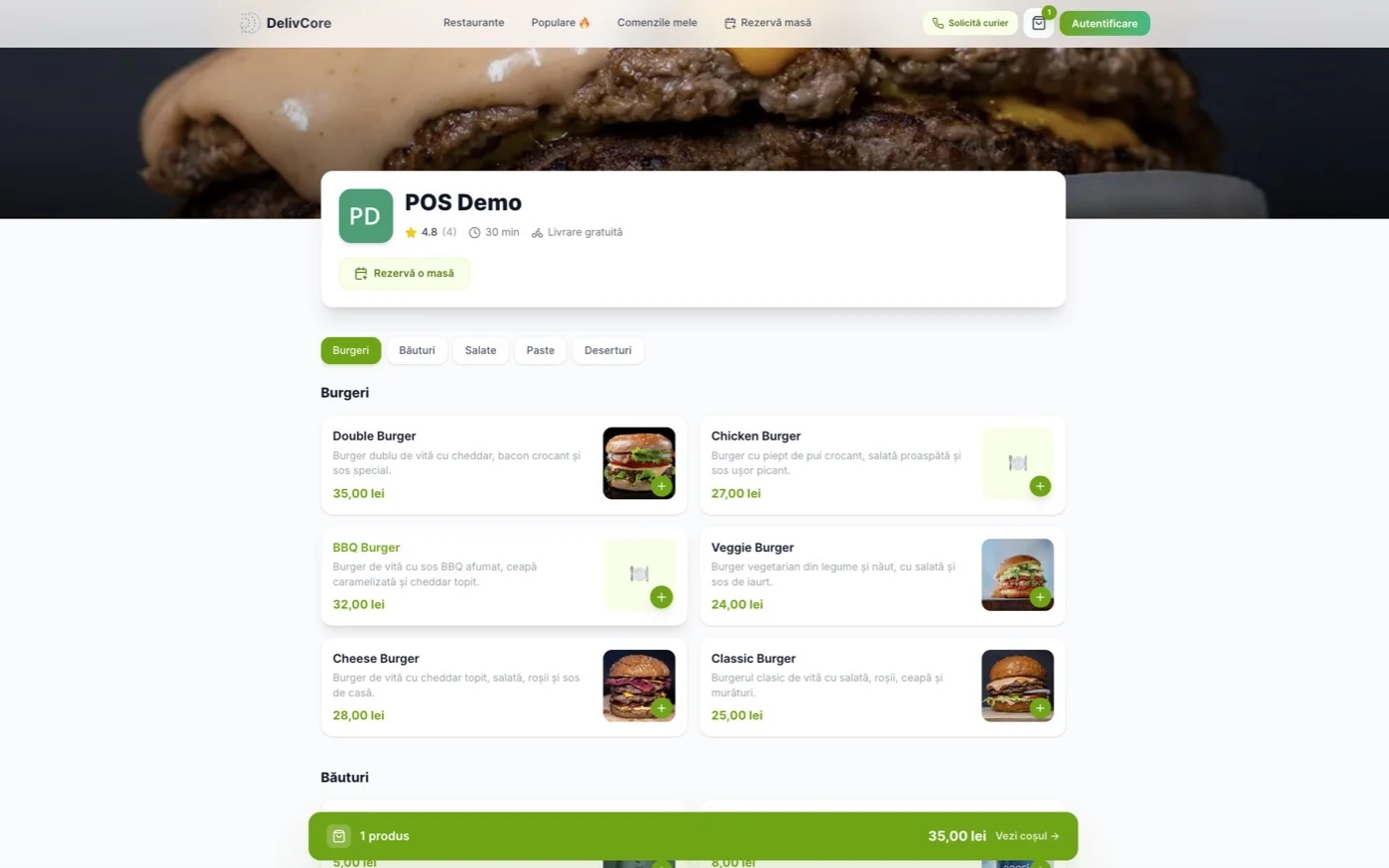
Use the customer-facing menu as an acceptance check: compare category placement, product names and prices with the restaurant’s approved source. Open an item and review its options, then add it to the cart. A correct-looking menu does not by itself confirm that the restaurant ticket contains the right details.
3. Check hours, coverage and preparation
Confirm opening hours, breaks and the procedure for exceptional closures. Review the delivery area and applicable fees with the operator. Test an address inside the planned coverage and one outside it; the outcome should match the service you intend to offer.
Ask the restaurant to use realistic preparation estimates for the pilot. A short estimate is not useful if the kitchen cannot meet it. Agree how a busy shift communicates delays and who decides when to pause new orders.
4. Train the team on a complete order
Have the staff member who will work the shift accept a test order, check its modifiers and identify the next action. Follow the kitchen ticket through preparation and the courier handoff. Confirm how staff distinguish two similar orders waiting for collection.
DelivCore connects customer ordering with restaurant POS and dispatch. The onboarding exercise should use the customer app or ordering website alongside the restaurant’s working screen, so the team sees the same order from both sides.
5. Run these go-live checks
Use a controlled test setup agreed with your implementation team. If a test uses real payments, agree who handles reconciliation before running it.
- Normal order: place an order with a modifier; confirm products, options and totals on the restaurant side.
- Unavailable item: mark a product unavailable and verify what the customer can order.
- Closed restaurant: verify that availability matches the configured hours or pause state.
- Delivery boundary: check an address inside and outside the intended service area.
- Courier handoff: follow assignment, collection and delivery status with the responsible people.
- Cancellation: rehearse the agreed support and payment-handling process.
- Support lookup: give support the order reference and confirm they can identify the restaurant and next action.
For each check, record the restaurant, test date, order reference where applicable, expected result, actual result, owner and any unresolved issue. Do not treat a test as passed simply because the customer screen looks correct.
6. Approve the pilot and review the first service
Before go-live, confirm that the menu is approved, the shift team knows how to accept orders, the delivery handoff works and support has the restaurant’s contact details. Resolve failures that prevent a customer from ordering correctly or receiving the order.
After the first service, review acceptance delays, preparation delays, unavailable items and support requests. Update training or menu configuration where needed. Expand the restaurant network when onboarding produces a repeatable result.
Plan onboarding alongside the marketplace launch
The food delivery marketplace launch guide covers the wider pilot. Use the marketplace cost guide to budget for menu work and staff training, then explore the multi-restaurant platform with a realistic onboarding scenario in your demo.