
The hotel and guesthouse manager app, on your phone.
See today's occupancy from anywhere, who is arriving and who is leaving, which rooms need preparing, and the takings. The data is the same as at the front desk, because it comes from the same hotel system.
Available to DelivCore customers with the hotel module, on iPhone and Android. The app interface is currently in Romanian.
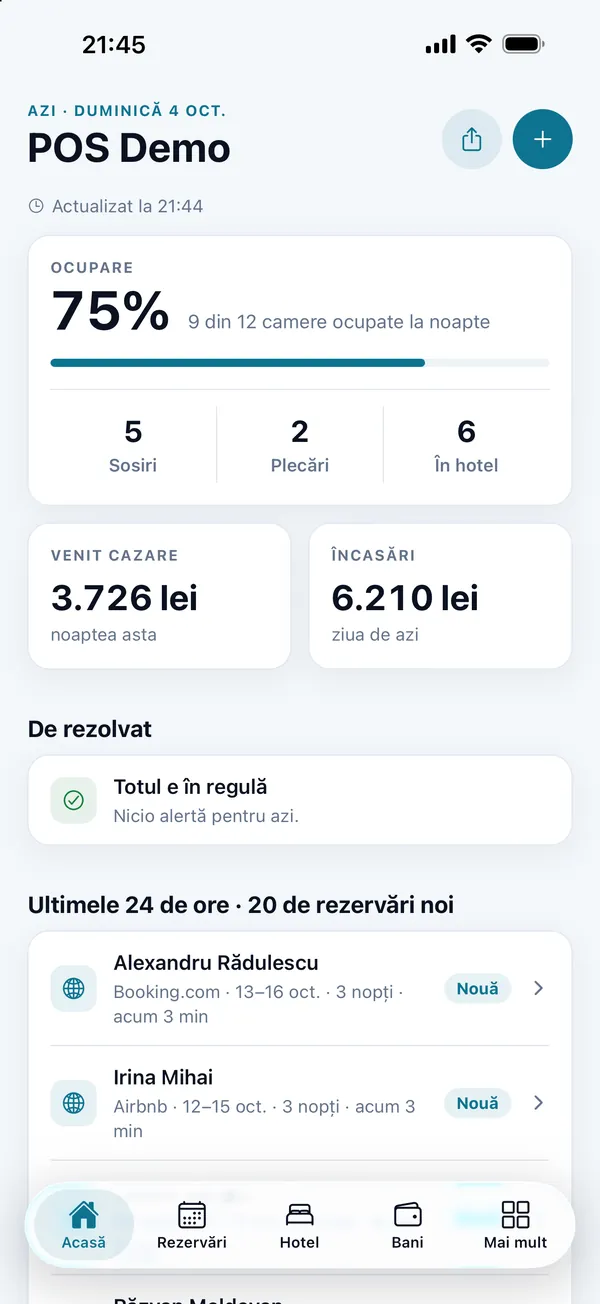
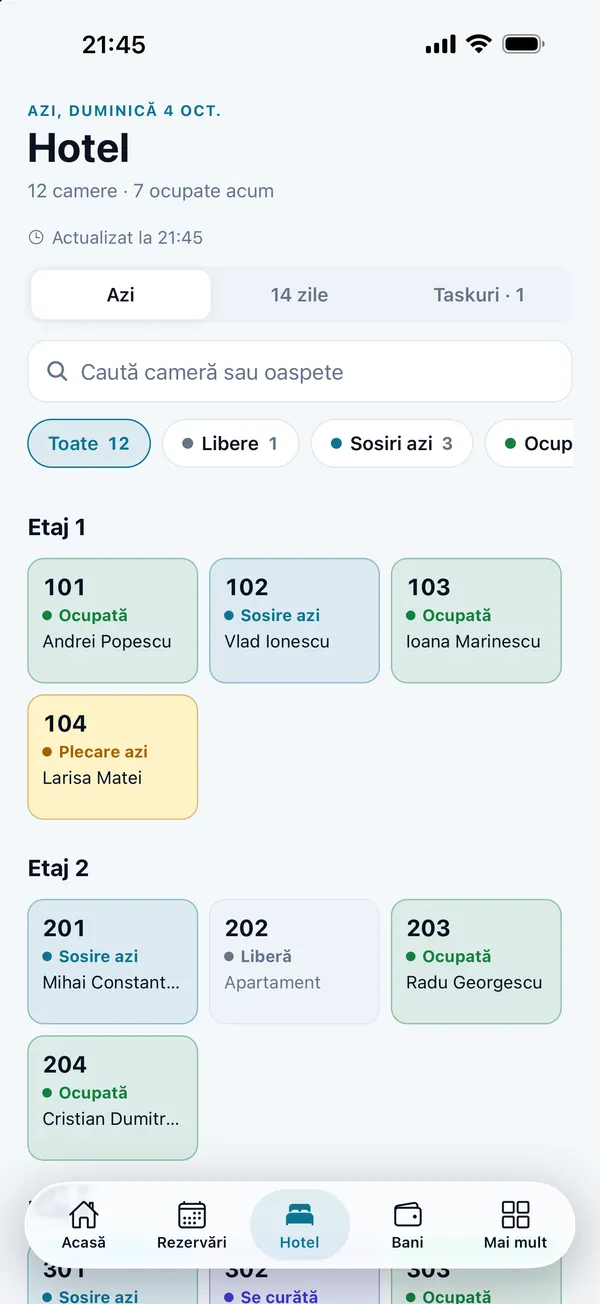
Screenshots from the app, on the DelivCore demo hotel. Guest names are fictional.
The hotel's day, at a glance.
The home screen shows what is happening in the hotel today and what needs a decision, before it becomes a problem at the desk.
Occupancy and movement
Today's occupancy, arrivals, departures and guests in house. Room revenue for tonight and the day's takings.
Needs a decision
Guest requests, stayovers, missed arrivals, departures with a balance, arrivals with no room, and rooms that are dirty or out of order.
What is next
Reservations made or cancelled in the last 24 hours, with their channel, occupancy for the next 7 days, and balances still to collect.
You can send the day's report as text, from the phone, to anyone you choose.
Every reservation, in one list.
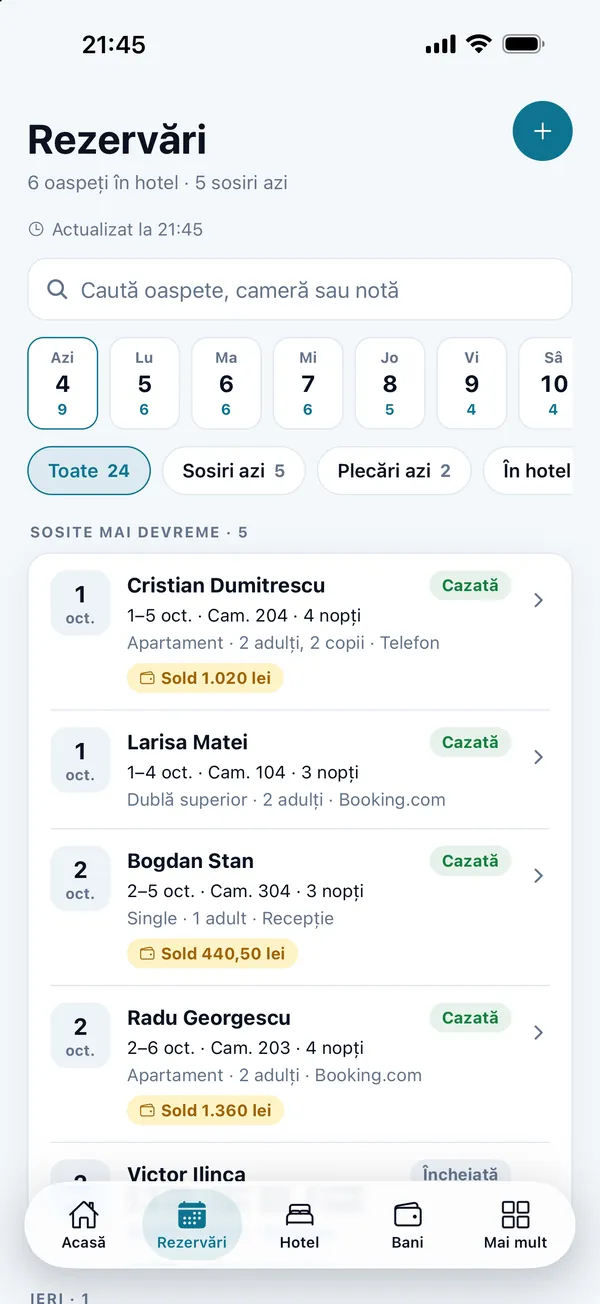
See reservations from yesterday through the next 60 days. Search by guest, room or note, and filter: arrivals today, departures today, in house, stayovers, missed arrivals, with a balance, or with no room.
Tap a day in the bar at the top and see who is sleeping in the hotel that night.
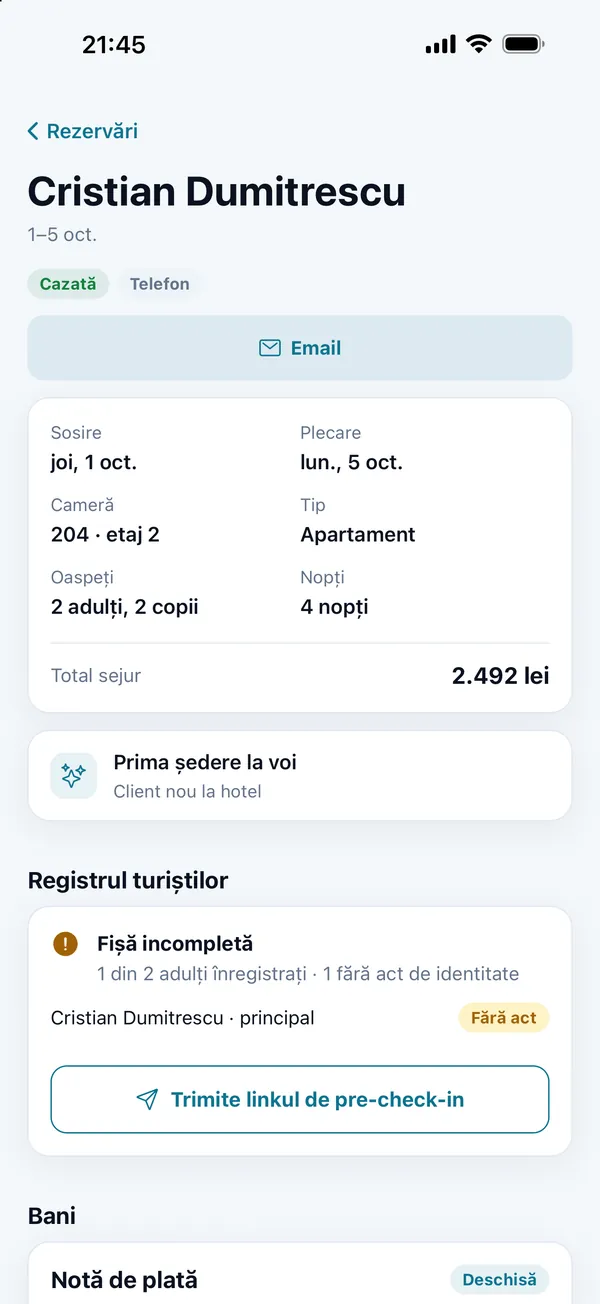
The whole stay, on one screen.
- The stay: the room, the guests, the nights and the total, plus the bill.
- Guest history: how many times they have stayed with you, and when they last left.
- The guest register: whose file is complete, and whose identity document is missing.
- The pre-check-in link, sent on WhatsApp: the guest fills in the file and a photo of their document from their phone, before they arrive.
- From the file you assign or move the room, change the departure date, update the phone and email, or cancel the reservation.
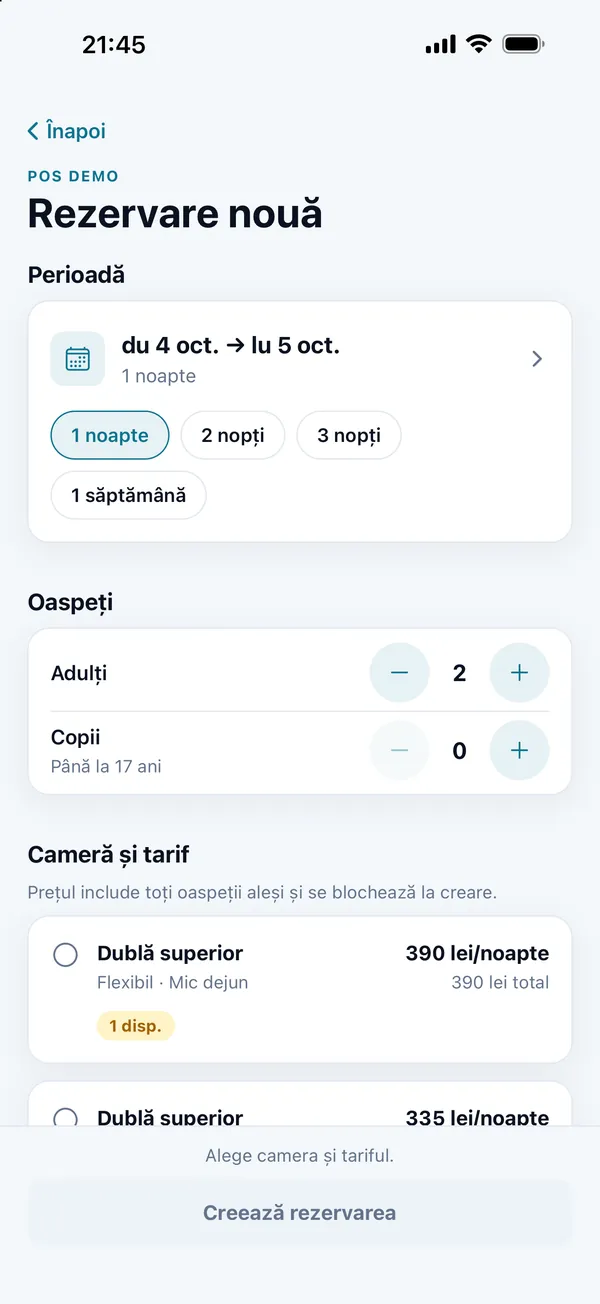
A new reservation, at the real price.
You choose the dates, the adults and the age of each child. The app shows the rooms that are free on each rate, with the price for every guest, and the price locks when you create the reservation. The guest receives the confirmation by email.
From the calendar, a free night starts a new reservation on that date.
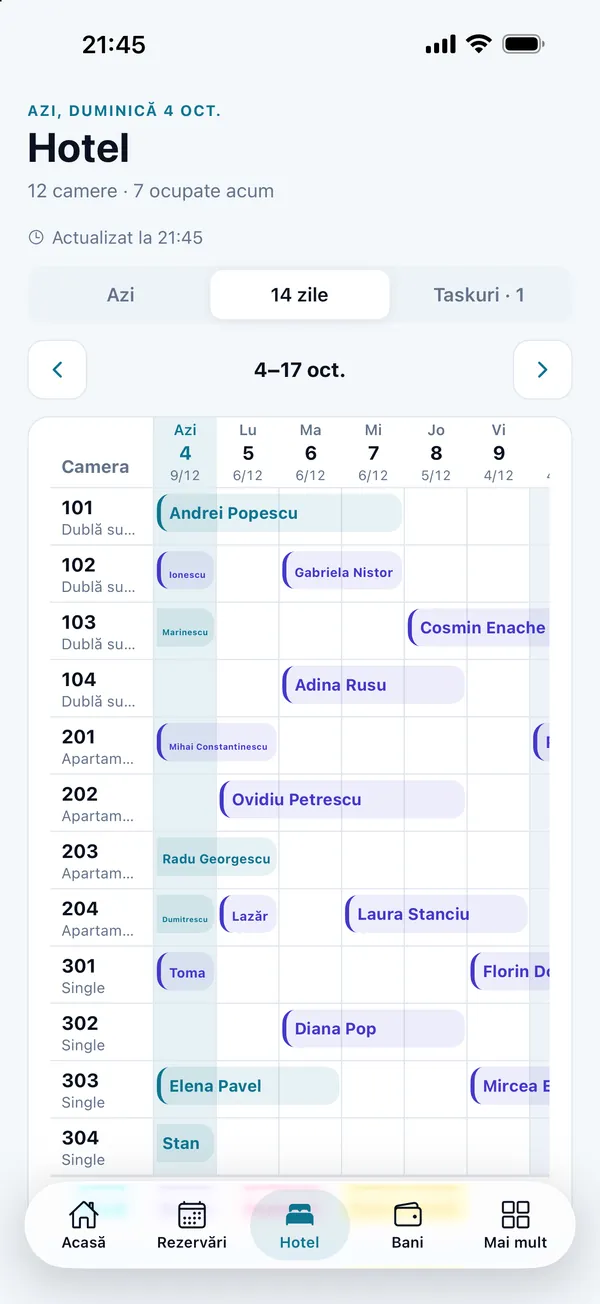
The rooms, today and across 14 nights.
- Today's board, by floor: vacant, occupied, arrivals and departures today, stayovers, dirty rooms, rooms being cleaned, or rooms out of order.
- The 14-night calendar: each stay on its room, and how many rooms are occupied each night. Move from one week to the next.
- Search and filters by room, guest or status.
For guesthouses without a round-the-clock front desk, see small-hotel software.
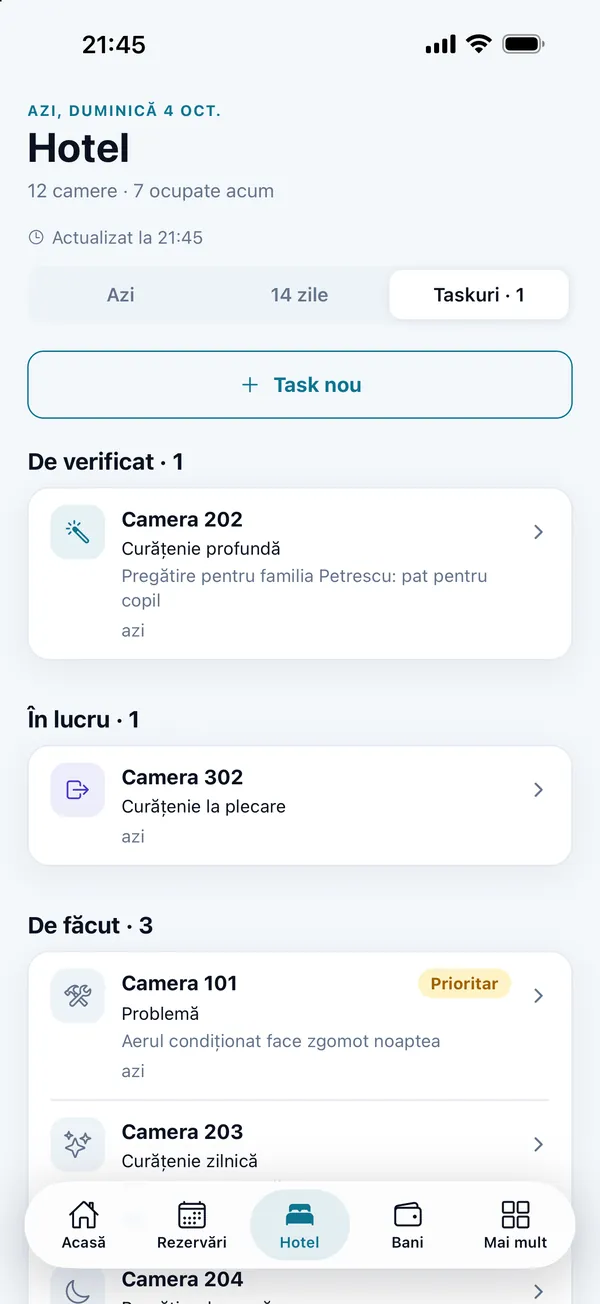
Housekeeping, without walking the floors.
See the housekeepers' tasks in groups: to check, reported problems, in progress, to do, and done in the last 7 days. Add a task for a room: what needs doing, the day, the priority and a note.
Housekeepers work in their own housekeeping app, tied to the same hotel system.
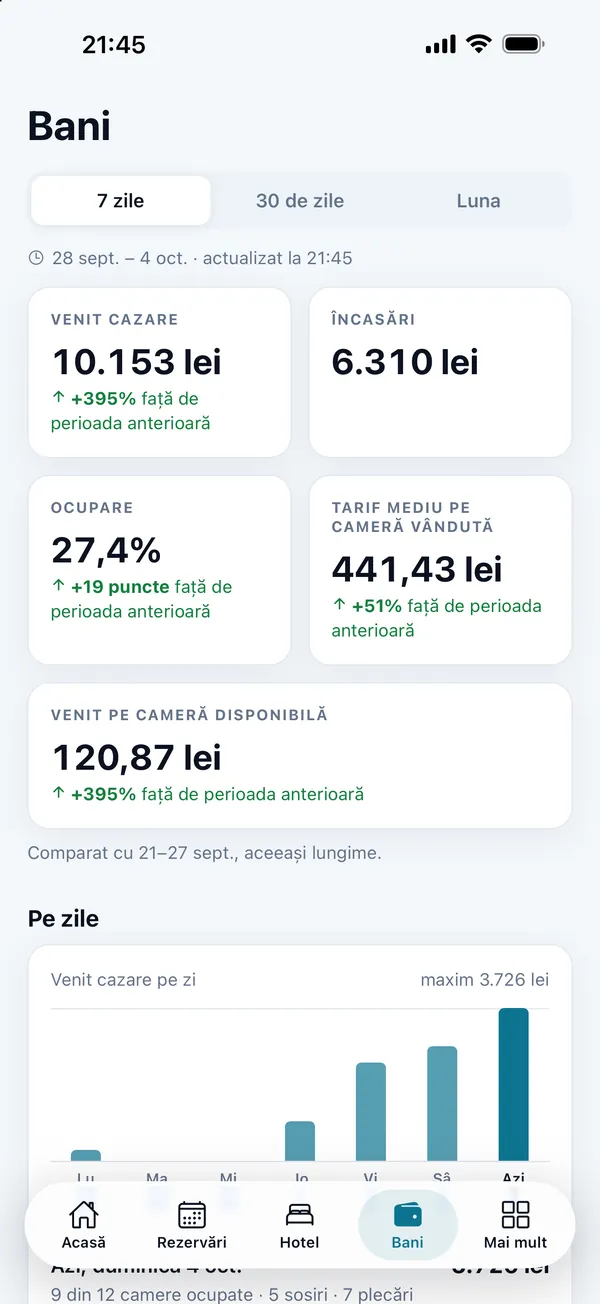
Revenue, occupancy, and what is coming.
- 7 days, 30 days or the month: room revenue, takings, occupancy, average rate on rooms sold (ADR) and revenue per available room (RevPAR), against the previous period.
- By channel: revenue from each booking channel, with the commission where one is declared, and takings in cash and by card.
- The next 30 days: nights sold, contracted revenue, what was booked in the last week, and the comparison with last year on the same date.
- Still to collect: guests with a balance on the bill.
Requests from the room reach you.
Guests ask for cleaning, a repair or a transfer from the QR code in the room. In the app you see requests from the last 30 days, and the urgent, scheduled or overdue ones are marked.
Guest request
A new request from a room, including the urgent kind.
New reservation
A reservation that just came in, with its channel.
Arrival with no room
A guest arriving today who does not have a room yet.
Departure with a balance
A guest leaving today who still has an amount to pay.
You turn alerts on in the app, by type, for the hotel you chose. They show while the app is open, and they update. Optionally, rooms that need cleaning too.
Several hotels. Access only for the people who need it.
All of your properties
Save your hotels on the phone and switch from one to another.
Owner and manager
Only the owner or an active manager of the hotel signs in. Access is checked for each hotel.
Without a signal too
The last figures that loaded stay on screen, with the time they were loaded.
How you start it
The hotel code
Enter the hotel code, or scan the QR code we gave you.
Your account
Sign in with the owner or manager email and password, the same ones as in the admin.
The hotel's day
You see the hotel's day. If you have more than one property, you choose which one to open.
The app reads the data in the DelivCore hotel system. You also run a restaurant? See the restaurant manager app.
Frequently asked questions
How do I get access to DelivCore Hotel?+
Is the hotel manager app for guests too?+
Which phones does the app run on?+
Can I make a reservation in the app?+
Do I also see reservations that came from Booking.com?+
Can I see more than one hotel?+
What do housekeepers see?+
Does it work without a signal?+
See the app on a DelivCore hotel
In the demo we show DelivCore Hotel connected to the hotel system: a hotel's occupancy, reservations, rooms and housekeeping, on a phone.